User guide
Your first review.
Step by step.
A guide to the workspace, from setting up a match to finding your next practice goal.
In this guide
Choose your public username
Open your profile to choose an optional Public username. Your public profile then uses /username, and shared public matches use /username/matches/match-id. Use 3–30 letters, numbers, underscores or hyphens, starting with a letter. Usernames ignore case and cannot be changed after saving. Choosing a username does not publish anything: control profile and match visibility separately.
Set up a match
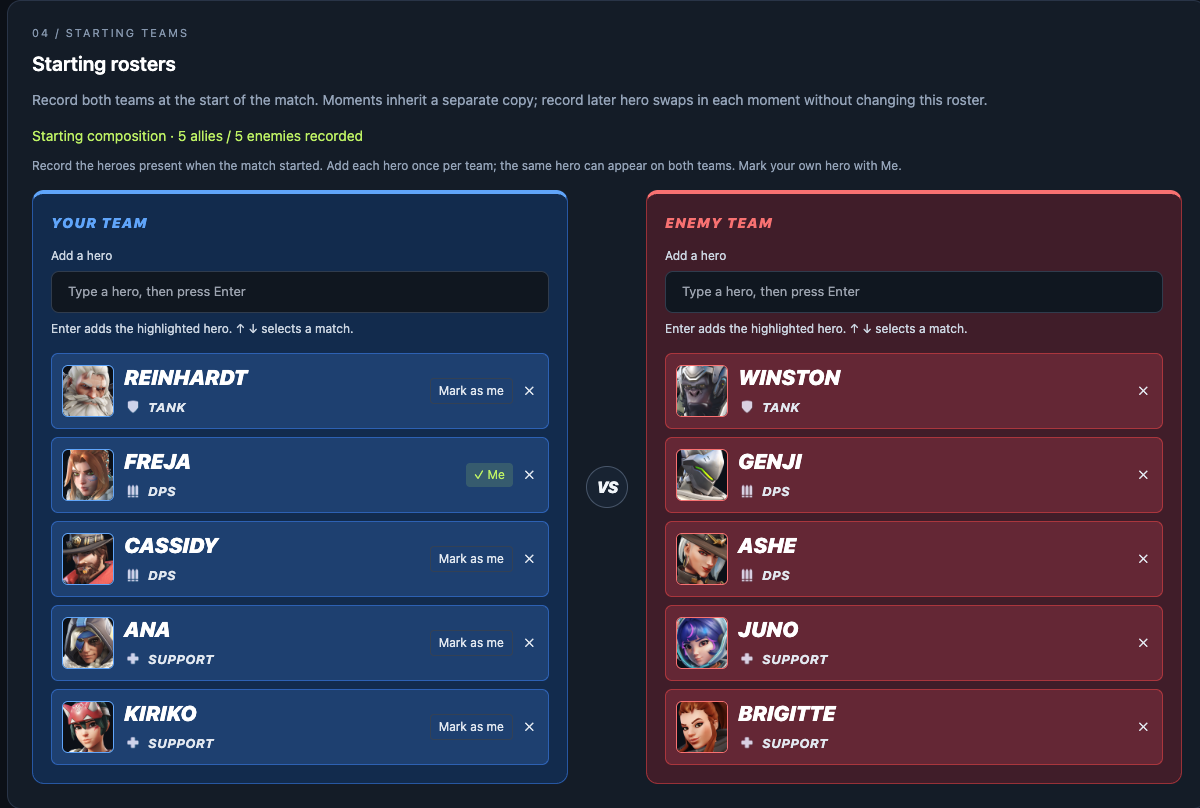
Open the app, sign in with your email and choose New match. The form starts in Simple mode: complete the required setup, including Player Name, and add a short match description. Your first entered Player Name is remembered for future reviews in this browser, separately for each account; existing saved reviews can also supply the default. You can override it for a particular match. Required fields are marked with an asterisk (*). Switch on Advanced for optional fields such as rank, match result, YouTube video and temperament context. Your choice is remembered in this browser for later forms.
Fill in both starting teams and mark your hero as Me. This identifies your role for the review questions.
Using a YouTube video
Switch to Advanced and add the YouTube URL beside the replay code. Choose whether moment timestamps refer to the video or the Overwatch replay. Video-based moments get a play button that opens playback at their timestamp; replay-based moments cannot jump into YouTube.
YouTube only loads after you choose to load the video in the playback window.
Add moments
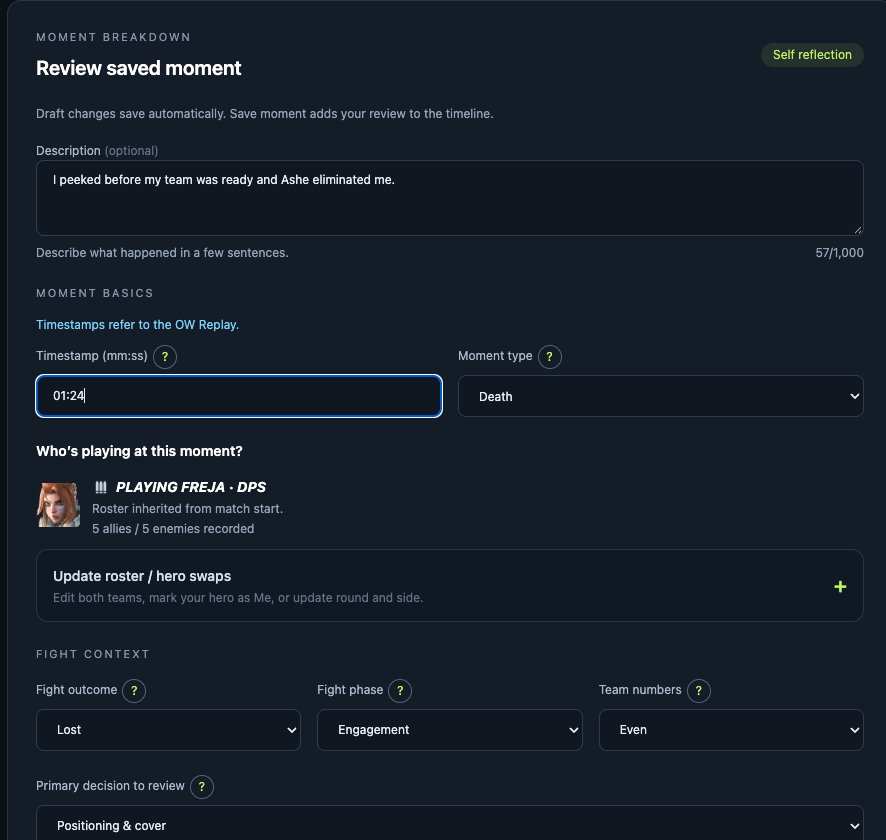
Choose Add a moment, enter the timestamp and select what happened: a death, duel, team fight, ultimate or another available type. Write a short description of the situation.
In Simple mode, enter the required timestamp, moment type and primary decision, add a description, and write your Key take-away. Switch to Advanced to update the inherited moment roster and fill in role reflections, positioning, survival and other categories. Your hero marked Me determines which role reflection is available.
Switching modes keeps all existing answers. Skip questions you cannot assess from the replay; explicit No and zero are still valid answers.
Save returns to your moments. Save and add another starts the next one. A match can have up to 25 moments.
Saving and unfinished work
An untouched new match is not saved. Leaving it or starting another discards it; it does not consume a history slot. Once you add match details or begin a moment, the workspace saves your draft automatically. Saving a moment adds it to the match’s saved moments. Check the save status before closing the tab; a failed save needs attention.
Read your timeline
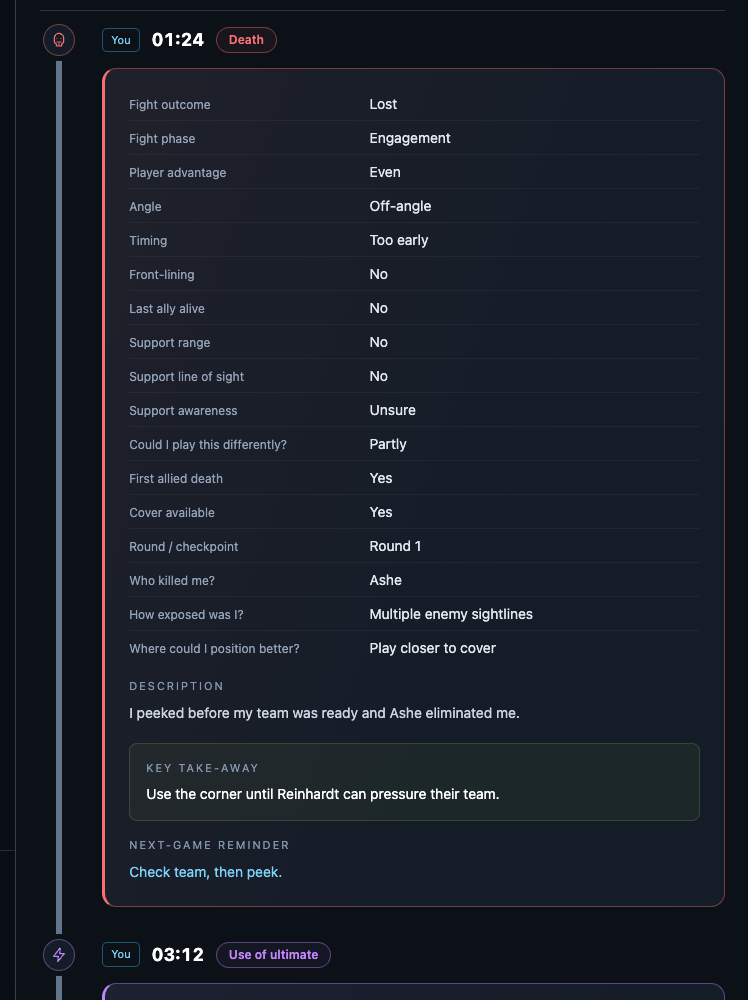
Select a match in Match history to open its read-only view. Moments run from the earliest timestamp down, with colors and icons for different moment types. The starting teams provide context, followed by roster changes when heroes swap.
Moments lead with their key take-away. Open Answers on a public moment to see its recorded questions, or use Expand all answers. The side pane also has a Show answers switch. Your existing visibility preference is preserved. Public pages continue to omit private moment descriptions. Choose Edit review to return to the form. Keep your match’s key take-away short enough to act on in the next game.
Explore Patterns & plan
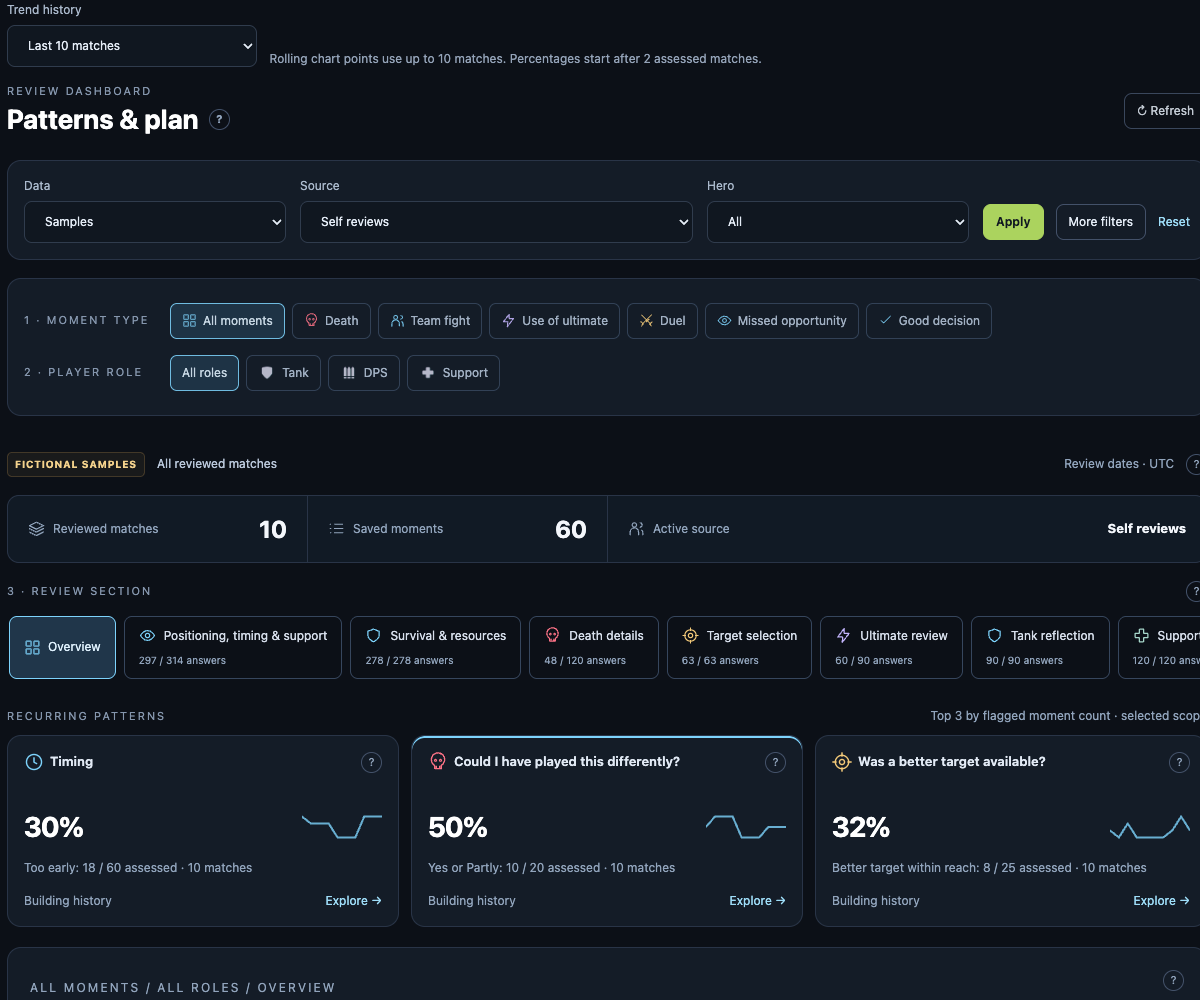
Choose your scope and review section, then select a question. Charts show how your recorded answers change over reviewed matches. Use the answer controls to show or hide lines and explore the underlying moments.
Published profiles use Match history and Patterns & plan tabs. A public dashboard includes only that player’s published self reviews. The example player uses fictional matches and answers, clearly labeled on its pages.
Choose 10, 20, 50 or 100 matches for the trend history. Early signals can appear after two matches, but a small sample can change quickly.
These are patterns in the moments you chose to review, not statistics for every fight you played. Check examples before choosing a practice goal.
Privacy & profile
Open your profile to set a display name, optional ranks and preferred trend history. Ranks are self-reported. Profiles and matches start private and have separate visibility settings.
Use a match’s visibility controls to publish it and copy its public link. Replay codes and videos have separate publication choices. Public reviews may be discoverable by search engines.
Only your latest 100 matches are kept; the oldest roll off as you add more. You can also delete a match yourself. See Privacy for sharing, retention and deletion details.
Share a profile and insights
In your profile, choose a Public username, enable your public profile, and save. Mark individual matches public to include them in your profile’s match grid. Private matches stay hidden.
To share trends, separately enable Publish my insights dashboard. Visitors can open /username/insights, choose a role, hero, map or moment type, then explore the same review sections and questions. Choose a window of 10, 20, 50 or 100 matches. Select answer labels to show or hide chart lines; select a chart point for percentages and sample sizes. Trends start with answers in two published matches.
Only published self reviews and their public question answers contribute. Moment descriptions, temperament, drafts and invited feedback are excluded. These are patterns in recorded reviews, not a skill rating. Switch off dashboard publishing or make your profile private to hide the dashboard.